
How to Turn Off Facebook Similar Page Suggestions

Want to disable similar page suggestions on your Facebook Page?
When a new fan “Likes” your Page, they get a series of suggested pages they may also wish to “Like.” These recommendations aren’t paid placements. Facebook bases suggestions on location, category, and other pages “Liked” by fans of your page. Fans can hover over a suggested page’s thumbnail to “Like” it right away, or click on it to go check out the page. Or, they can click “See All” to be taken to the full “Like Your Favorite Pages” browser.
It’s cool that the suggested pages are based on fans’ interests, rather than what’s most popular. But it is a distraction from spending more time on your page, which they just “Liked.” Suggested pages might tempt them to click away quickly.
Participation in Page Suggestions is voluntary. But if you opt out of having suggestions shown to your new fans, then your page won’t be suggested to new fans of other pages. It’s a tradeoff.
I’ve been asked for this info by a reader who found the suggestions totally irrelevant to her page. Others may not want their new fans being steered to competitors (see screen shot below). It’s your call!
 Facebook Similar Page Suggestions may lead new fans to your competitors.
How to Turn Off Facebook Similar Page Suggestions
- From the top of your Page, click Settings.
- From General, click Similar Page Suggestions.
- Click to uncheck the box next to Include [Page name] when recommending similar Pages people might like on a Page timeline.
- Click Save Changes. source
NOTE 4/26/2016: According to a reader’s comment, this fix doesn’t remove the “People Also Like” in the left sidebar. Since these instructions come directly from Facebook, I can only guess that this feature either no longer works, is temporarily disabled, or has a “Facebug.”
(This post was originally published August 2013 and updated April 2016).
If the “People Also Like” section is still showing in your left sidebar, the best suggestion I can offer is:
- Hover the top bar of the section and click the Edit pencil.
- Click Manage Sections.
- Click the”People Also Like” bar and drag it to the bottom of the list.
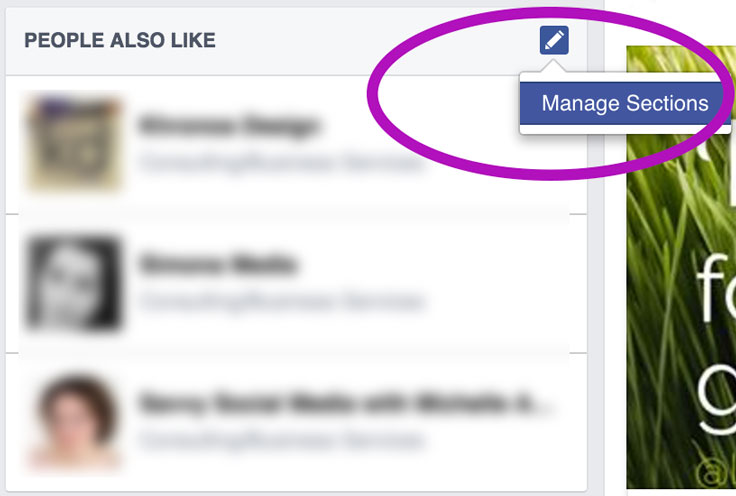 It seems we can’t get rid of “People Also Like” in the Facebook Page sidebar. But you can drag it to the very bottom via “Manage Sections.”
Now, at least it will be below all other sections – and probably never noticed.
So what do you think? Facebook similar page suggestions – yay or nay?
{loadposition user99}


Leave a comment