
How to Delete Pinterest Pins with Aggregate Pin Counts

Wondering how to delete Pinterest Pins now?
Aggregate Pin counts make it tough to know which pins are performing – and which are losers.
If you were a fan of deleting poor Pins to enhance your standing with Pinterest – I’m here to tell you that you still can.
You need a secret weapon to rout out those baddies, because Pinterest’s not telling.
I use Tailwind. I find it invaluable for building my Pinterest account, because it makes it so easy to pin consistently.
That I can easily find underperforming (as well as top-performing) Pins is an added benefit.
Should You Delete Pinterest Pins?
Even though I’m using Tailwind stats to delete pins, I know they don’t believe deleting pins is necessary. And there are others who agree.
BUT the people who have tried it have seen the results – getting rid of underperforming pins makes your average repin rate much better.
And since the Pinterest Smart Feed favors Pinners who get a lot of repins (among other things), this is a good thing!
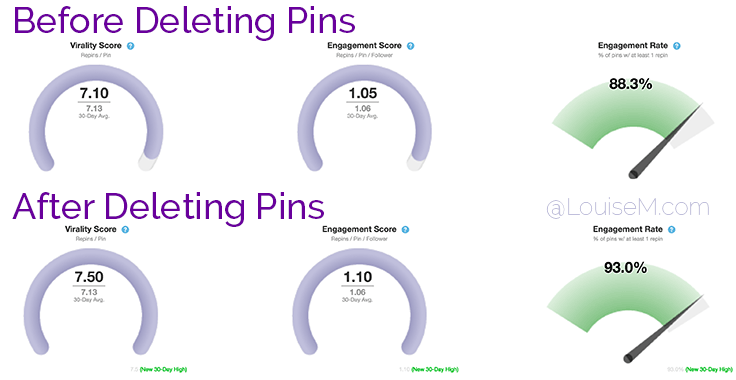 After deleting underperforming Pins, you’ll see your repin rates go up.
Which Pinterest Pins Should You Delete?
Here’s what I think: don’t delete pins from your own website.
Since other Pinners see the total number of times a Pin has been pinned, you’re shooting yourself in the foot if you delete your own website’s pins. You’re making your own pins look less popular.
But of course, you’re pinning other people’s content as well. And those are the Pins you should delete – if they’re not performing.
Plus, going through your poorly-repinned Pins will help you see which content isn’t resonating with your followers – and which boards aren’t working for you.
If you’re consistently deleting Pins from certain boards, maybe you should stop pinning to those boards!
- Improve the name and description, if it’s your own board.
- Consider deleting it or making it secret, if none of the Pins are doing well.
- If it’s a group board, consider leaving the group.
As far as which specific Pins are poor performers – it depends on your personal repin numbers. If you’re averaging a few repins per Pin, just delete the zeros.
Should you delete recent Pins? I’m deleting Pins that haven’t performed in a month. At the end of each month, I’ll follow the procedure below for the previous month. So, at the end of May, I deleted bad Pins from April.
How to Delete Pinterest Pins Step by Step
Here’s my process. Caution: Note the board pinned to, and the domain. Don’t delete pins from your secret boards, or from your own website.
- In your Tailwind Plus dashboard, go to Optimize Content > Pin Inspector.
- Go to Filter by Date Pinned and select the desired time period.
- Now click the Repins header so they sort by worst to best.
- Check which board and domain you’re deleting from!
- Click on the first Pin image. This takes you to the Pin on Pinterest*.
- On Pinterest, you can click on the Edit button and then delete the Pin.
- The page will go blank. Close it, go back to Tailwind, and repeat.
- Or you can open several Pins at once – whatever works for you.
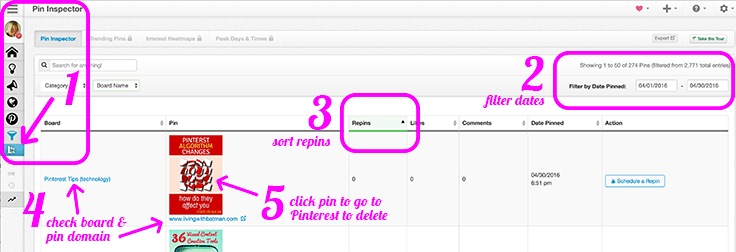 Here are the steps to deleting Pinterest Pins using the Tailwind Pin Inspector.
Note that the left column shows which board this Pin resides on. Take note of the boards that appear frequently and consider if you’re wasting time pinning to these boards.
Also observe which pins keep coming up with low repins, and see if you can determine some commonalities. Domain, topic, look? I saw an awful lot of light-colored Pins popping up with 0 repins again and again. I’ll be keeping an eye on that trend!
*If you get a “whoops, we can’t find that page,” you’ve probably already deleted the Pin. Tailwind still shows Pins that have already been deleted, so make note of which dates you’ve “cleaned,” and don’t re-search those dates.
How Long Does It Take to Delete Pinterest Pins?
Of course, this will depend on how many Pins you pin, and how aggressive you are about deleting.
I pin about 10 times per day (300 a month), and it took me about 40 minutes to delete a month’s worth of underperforming Pins, the first time I tried this method.
I expect I’ll get faster, and I also hope I’ll have less Pins to delete as I notice patterns – I want to stop pinning stuff that doesn’t resonate!
Forty minutes per month seems like a good investment in my pinning “clout,” as well as discovering what’s working, and isn’t.
Want to Build Your Website Traffic and Pinterest Followers?
Pinterest is the BEST source of social media traffic to websites. Each Pin can send traffic to your site for months, and even years.
If your blog has evergreen content, Pinterest should be your BFF!
To build followers, you’ve got to be pinning regularly, so they can find you! With Tailwind, I can schedule 50+ pins for the week in minutes. I find it invaluable.
• • • Try Tailwind for FREE • • •
I’m a Tailwind affiliate, which means I’ll make a small commission if you purchase. You don’t pay more, and your purchase helps support my blog.
Give it a try – I really think you’ll love it!
Not only is it fantastic for scheduling, but necessary if you want to delete Pinterest Pins!

{loadposition user99}


Leave a comment