
What’s the Correct Facebook Event Image Size?

The Facebook event image size differs from both the Fan Page and the personal profile!
Photos on the event page wall will be seen at 470 pixels wide, up to 470 pixels tall, depending on the shape photo you upload.
Feel free to make them bigger (but not smaller, for best results). Both myself and Facebook often recommend a 1200 pixel width.
And the event cover photo?
According to Facebook, the correct Facebook event cover photo size is 784×295 pixels. Pictures uploaded in a wider proportion will have the sides cropped. Taller images will be cropped top and bottom.
Photos uploaded at less than 784 pixels wide will be enlarged to fit. This isn’t ideal as you lose resolution, making your photo look fuzzy or jaggy. Start with a large enough image, preferably in a horizontal format. I recommend 1200 pixels wide minimum. Read on…
Facebook Event Cover Photo Size: Desktop AND Mobile
UPDATE: I’m hearing from many of you that you’re having problems making the header image look good on both desktop and mobile. No surprise – this issue exists with Facebook Page cover photos too.
Since most views of Facebook are on mobile, I suggest you optimize that first.
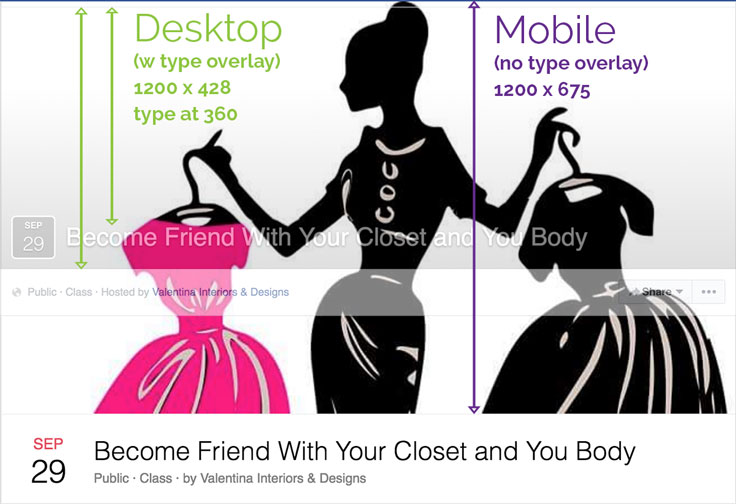
I’ve pictured the desktop header overlaid on the mobile one. Note that the mobile shape gives you almost twice the height to play with. On desktop, the event’s date and title will be added by Facebook over the lower portion of the cover photo. No type overlay on mobile.
I recommend creating 1200 pixels wide x 675 pixels tall to look best on mobile. Consider that the height will be cropped to 428 pixels on desktop – and figure on a maximum of 360 pixels of unobstructed height on desktop. So keep the lower half of your image simple!
You can make the event description quite long – it can go up to two full lines across. Be sure to allow for that overlay if you’re placing type on your Event Cover Photo.
If you’re having trouble with fuzzy text or artifacts in your flat tones (seen above and below), try saving your image as PNG-24 in Photoshop.
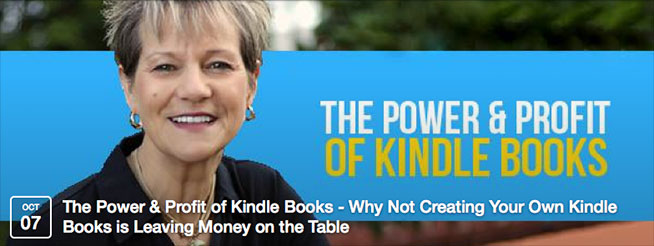
For another take, listen to reader Stephen Billington:
I’ve found that, although not perfect, a size of 1200 x 628 works the best for the cross platforms. For me it’s important that the mobile event picture should appear full in the page feed. The mobile event page picture itself loses a touch off the sides and it looks good on the desktop version in both the feed and the event page.
If you do a lot of FB Events like Stephen does, and use text on your Cover Image, you might play around to see what works best for your needs. True confession: I almost never look at the FB news feed, so I couldn’t tell you what looks best there.
By the way, if you’re on desktop and want to see what your event, page, or profile looks like on mobile, just replace the “www.” in the URL before Facebook.com with an “m.” Voila! Mobile layout on desktop.
This post was originally published on October 8, 2014, and updated September 30, 2016.
NEW October 7, 2016: Facebook launches standalone Events app. I can’t say how this might affect the cover photo. Let’s hope not!
Events app is currently only available for iOS. An Android version is supposed to be coming soon.
[embedded content]I hope these updated tips helped you with the correct Facebook event image size!
{loadposition user99}


Leave a comment